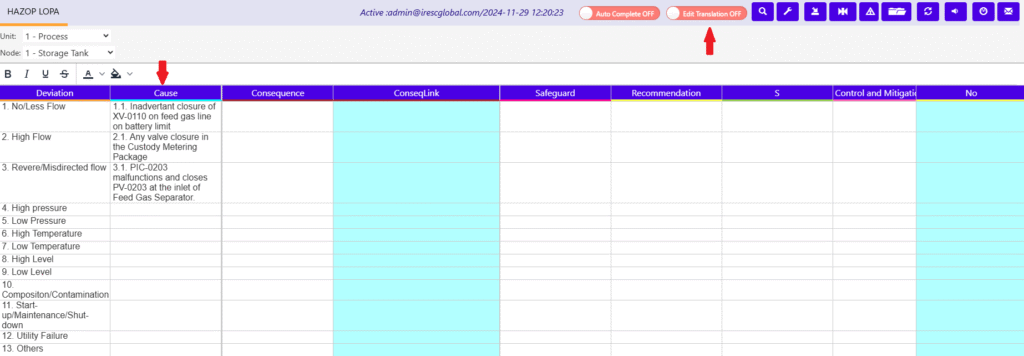
The worksheet that has translation configuration will have on/off switch as “Edit Translation OFF ” like image shown below in which “Cause” column has configured for Translation.
1) The Worksheet “Edit Translation Off” will be the usual worksheet with out any difference on User perspective.
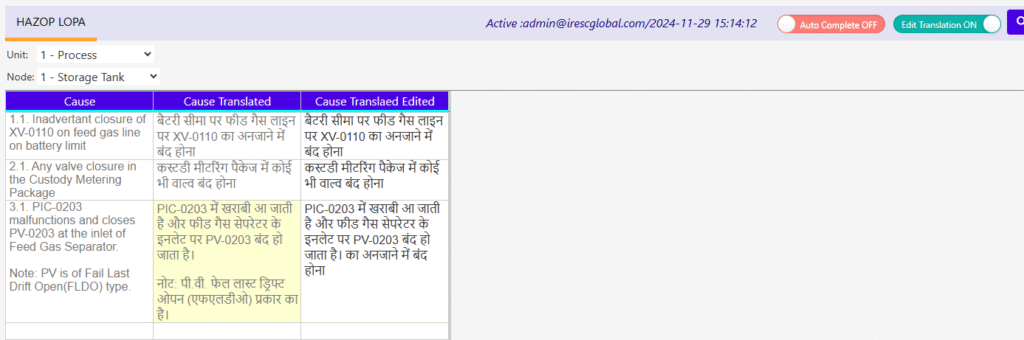
2) The Worksheet “Edit Translation ON” will display only the column that has configured with “Translation” option along with following fields.
Field to have the translation result which is non-editable.
Field to have the translation which is editable.
The translation from the source will be updated on non-editable cell automatically(on refresh the screen will be updated) where as the editable cell will be updated only if that cell is empty or has same content as non-editable cell.
If there is any change/update happened in non-editable cell after the editable cell is updated, then it will be highlighted with pale yellow color as shown below.